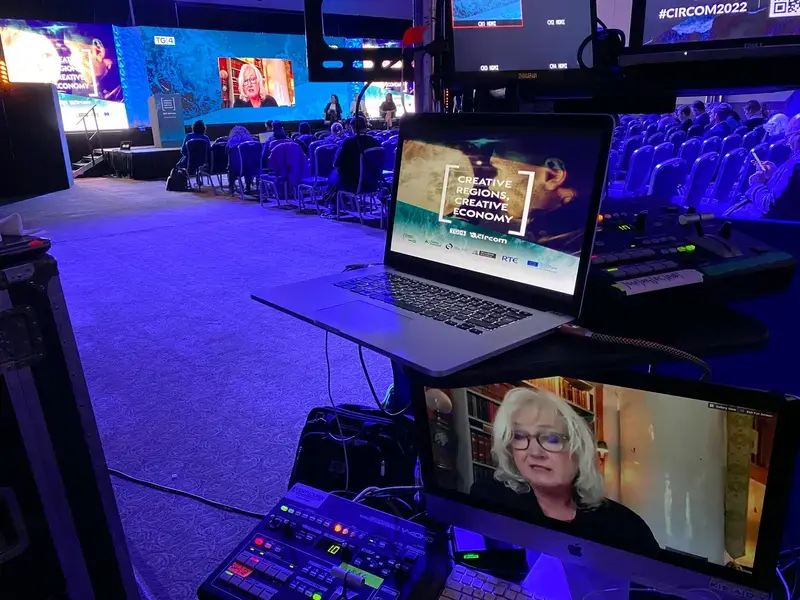
An AGM is a one-take event. There's no second recording session if the stream fails during the chairperson's report, and the meeting itself has formal standing (motions and votes, with minutes to follow). A town hall carries a different pressure: leadership answering unscripted questions in front of the whole organisation. AGM live streaming is therefore less about elaborate production and more about three decisions made properly: how many cameras, which platform, and what happens when something fails.
The short answer: one to three cameras depending on the length and weight of the meeting, a platform chosen by who must watch and who must interact, and a wired connection with a cellular backup. This guide walks through all three. The camera and vision-mixing side of the job sits under our video production service. The platform, remote-attendee and streaming side sits under virtual events.
What makes an AGM different from an ordinary stream
- It's on the record. Votes and proceedings may need a complete, accurate recording, not just a live feed.
- The audience is defined. Members and shareholders, or staff. That changes the platform decision, because access control suddenly matters.
- Questions come from the floor. The least controllable audio at any event, and the part remote viewers most need to hear.
- Rules may apply. If remote attendees are meant to count towards quorum or vote, check your constitution or governing rules before you brief any AV supplier. That's a governance question, and it shapes the whole technical setup.
Sometimes a board member joins the meeting remotely. Or an auditor, or a guest speaker. If they're taking part rather than just watching, that's a hybrid session, and it needs its own rehearsal and audio plan. Flag it early, and put the number of remote presenters in your written AV brief. Our conference AV technical brief guide shows how to write one.
Cameras: how many you actually need
One camera, honestly
For a small AGM with a single top table and slides, one well-positioned locked-off camera with good audio is genuinely enough. Anyone insisting every AGM needs a multi-camera shoot is selling you something. The picture will be static. But the audience is there for the content and the votes, not the cinematography.
Two or three cameras, the working standard
Once the meeting runs past an hour (or has several speakers, or matters reputationally), two to three cameras earn their keep: a wide shot of the top table, a closer shot of whoever is speaking, and optionally a third covering the floor for questions. A vision mixer cuts between them live, which keeps a two-hour meeting watchable and means the recording needs no editing afterwards.
If the room itself is large, the same cameras can feed screens in the room (known as IMAG, or image magnification) so the back rows see faces rather than dots.
Audio decides whether the stream is watchable
Streams die on audio far more often than on video. Viewers forgive a soft picture. They leave over a voice they can't hear. Three rules:
- Every voice that matters gets a microphone: top table, lectern, and roving handhelds for floor questions.
- The stream gets its own dedicated audio mix, never a microphone pointed at the room PA.
- The chair enforces one discipline: no microphone, no question. Repeating the question from the chair's mic is the fallback, not the plan.
Choosing the platform
YouTube or Vimeo: reach without friction
No logins, works on every device, no audience-size worries. An unlisted link narrows the audience, but it isn't security. Anyone holding the link can watch and share it. The right choice for public town halls and bodies content to be watched by anyone.
Teams or Zoom: control and interaction
Registration, attendee lists, Q&A tools and, on some tiers, native polling. The trade-offs are join friction and attendee limits. The right choice when remote attendees must be identified, speak or vote.
Your own website or member portal: custom RTMP
The stream can be pushed straight into a page you control, behind a member login if needed. The right choice for member-only AGMs where privacy matters but Teams-scale interaction is unnecessary.
We stream to YouTube, Vimeo, Teams, Zoom or a custom RTMP destination through broadcast-grade encoders, so the platform decision can follow your governance needs rather than an equipment limitation.
The internet connection: where AGM streams actually fail
Venue wifi isn't a streaming connection. It's shared, variable and unmonitored, and it degrades at the exact moment the room fills with phones. A stream needs three things:
- A dedicated wired connection. We recommend a minimum 10Mbps dedicated upload, with "dedicated" meaning reserved for the stream, not shared with the venue's guests.
- A backup path. We run redundant internet: the wired line backed by bonded cellular, which combines several mobile networks into one connection. If the venue line drops, the stream carries on.
- A test in advance. Measure the upload at the venue, ideally at the same time of day as the meeting, not on a quiet mid-morning. A line that tests fine at 10am can struggle once a full room is online.
What can go wrong, and what prevents it
| Failure | What viewers experience | What prevents it |
|---|---|---|
| Dead or late link | "Starting soon" forever | Publish the link early. Test end-to-end the day before. Open with a holding slide |
| Inaudible floor questions | Half the meeting missing | Roving microphones and a chair who enforces them |
| Echo or hum | Fatigue and drop-off | A dedicated stream mix, not a mic at the PA |
| Venue broadband drops | Frozen picture mid-vote | Wired connection plus bonded-cellular backup |
| Confidential moment streamed | A governance problem | A pause protocol agreed between chair and operator |
| Recording lost | No record to support minutes | Record locally alongside the platform |
The table above is the AGM-specific slice of a longer discipline. Name the likely faults in advance, then remove each one with a test, a spare or a person in the room.
A pre-stream checklist
- Governing rules checked for remote participation and voting, before the AV brief
- Platform chosen to match who may watch and who must interact
- Stream link published early and tested end-to-end
- Dedicated upload measured at the venue (10Mbps minimum)
- Backup connection in place
- Microphone plan covers the floor, not just the top table
- Dedicated stream mix confirmed
- Local recording running alongside the stream
- Pause protocol agreed between the chair and the operator
- One person assigned to watch the public stream as a viewer throughout
Frequently asked questions
What equipment and crew do I need to run a properly produced live stream from a corporate event?
Equipment: one or more cameras, a vision mixer to cut between them, a broadcast-grade encoder, a dedicated audio mix from your microphones, and redundant internet (a wired line plus bonded cellular, with at least 10Mbps of dedicated upload). Add screens in the room if you want IMAG. Crew, in general trade terms: someone on camera, someone vision mixing, someone on audio, and someone watching the encoder and connection. On a small event one person can cover two of those jobs. A larger one splits them. How crew and kit scale with the event is covered in our guide to what drives conference AV costs.
Do we need to tell attendees the meeting is being streamed?
Yes, in advance and on the day. And position cameras to favour the top table rather than the audience. If attendees will be identifiable on the stream, take data-protection advice appropriate to your organisation.
Can remote members vote during the stream?
Teams and Zoom offer polling on some tiers, and dedicated AGM voting services exist. Whether a remote vote counts is a rules question for your organisation, not a technical one. Settle it first.
Can we stream and record at the same time?
Yes, and you should. A local recording alongside the platform's copy protects the formal record and supports the minutes.
How much notice does a supplier need?
Enough to test the venue's connectivity and fix what the test finds. A few weeks is comfortable. Two days is a gamble.
Streaming your next AGM or town hall
Send us the date, the venue, the expected in-room and online numbers, and whether remote attendees need to speak or vote. We'll talk through camera count, platform and connectivity with you. Talk to our production team.